
Training / Advertiqo console / Lesson 1 of 4
The Advertiqo console
The console is our own control room. From it we create resorts, decide what each one gets, see how much they use, and bill them. No resort can see it, not even a resort's Owner.
- Modules
- M60 Advertiqo console · M61 Multi-tenancy
- Who uses it
- Advertiqo staff only
- Where
- /console, with its own sign-in
What it is for
Every resort lives in the same system. Something has to sit above them all: to add a new customer, to switch on what they paid for, and to send them a bill. That is the console.
A separate sign-in
Console accounts are kept apart from resort accounts in every way:
- You sign in at
/console/login, not at the resort sign-in page. - A console account belongs to no resort. It cannot sign in to a resort's screens or the staff app.
- A resort's Owner cannot sign in to the console. Opening a console address shows them only the console's sign-in page.
- The password must be at least 12 characters. The session ends after 60 minutes without a click.
- New console accounts are made by a command on the server, never from a screen.
The resorts screen
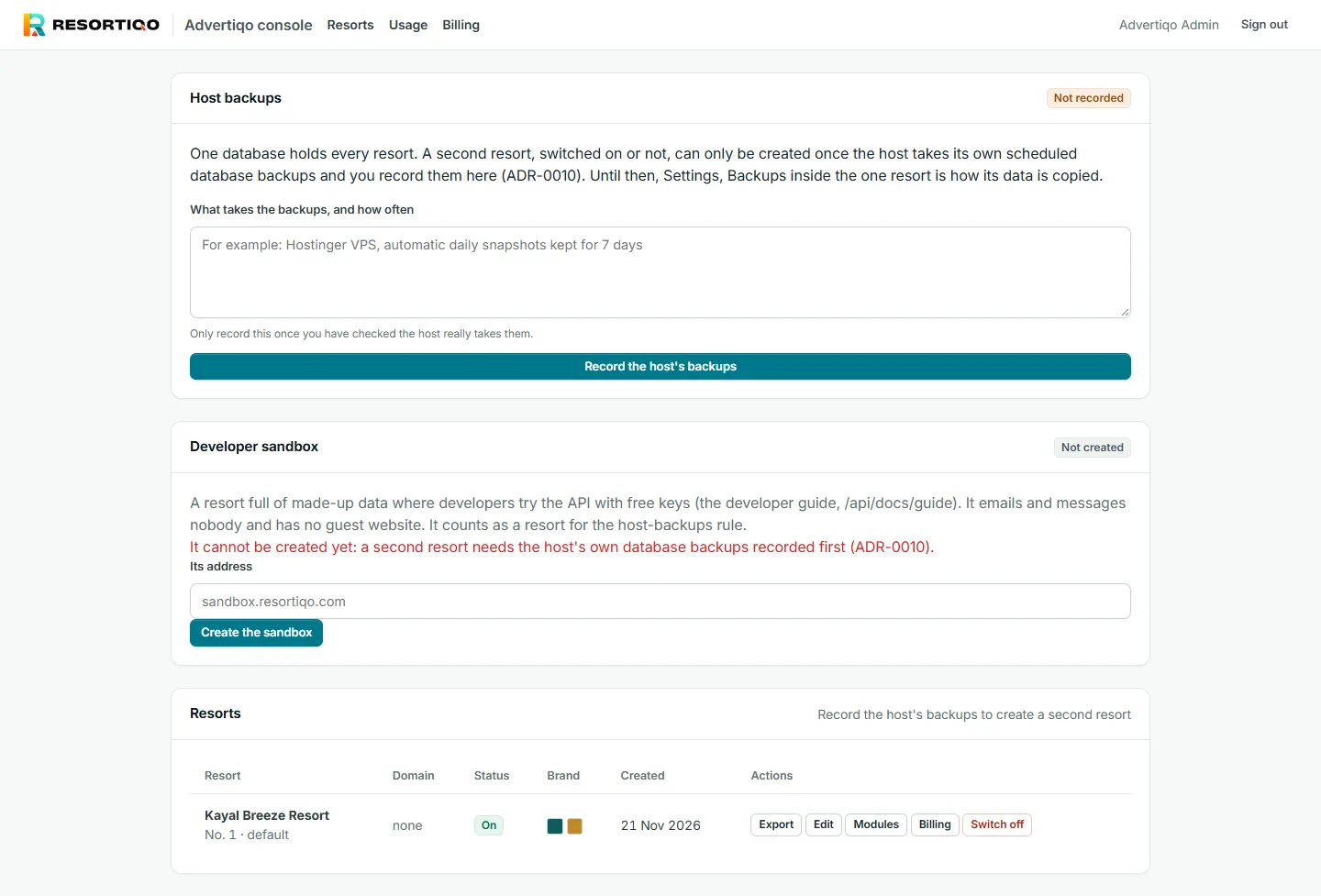
Each resort is one row with its name, domain, whether it is on, its brand colours and when it was made. The actions on each row are the rest of this section:
| Action | What it does | Lesson |
|---|---|---|
| Edit | Name, domain, logo and colours | Creating a resort |
| Modules | Which modules the resort has | Modules, plans and limits |
| Billing | Its plan, invoices, payments and dues | Billing a resort |
| Export | A full copy of the resort's data, to move it | Below |
| Switch off / on | Stops or restores the resort | Below |
The host backups rule
At the top of the screen is a box that today reads Not recorded. This is the most important rule in the console:
All resorts share one database. Before a second resort is added, the hosting company must be taking its own scheduled backups of that database, and someone must record that fact here, saying what takes the backups and how often. Until then the console refuses to create another resort, and the sandbox too.
This is a safety rule, not a bug. With two resorts in one database and no outside backup, one bad day could lose two customers' data. Record it only after checking that the backups really run. Today's shared hosting does not provide them, so this is the main thing standing between us and a second customer.
Switching a resort off
Switch off is for a customer who has stopped paying or has left. Their website and sign-in stop answering, their staff are signed out at their next click, and their app sign-ins and API keys stop working. Nothing is deleted. Switching back on restores everything. The last resort that is on cannot be switched off.
Exporting a resort
Export makes a complete copy of one resort: every record, its uploaded files, and lists for Excel. It is used to move a resort to another installation. It is logged in the console's log and in the resort's own audit log, so the resort's Owner can see that we took a copy. The file is deleted after 24 hours.
Usage
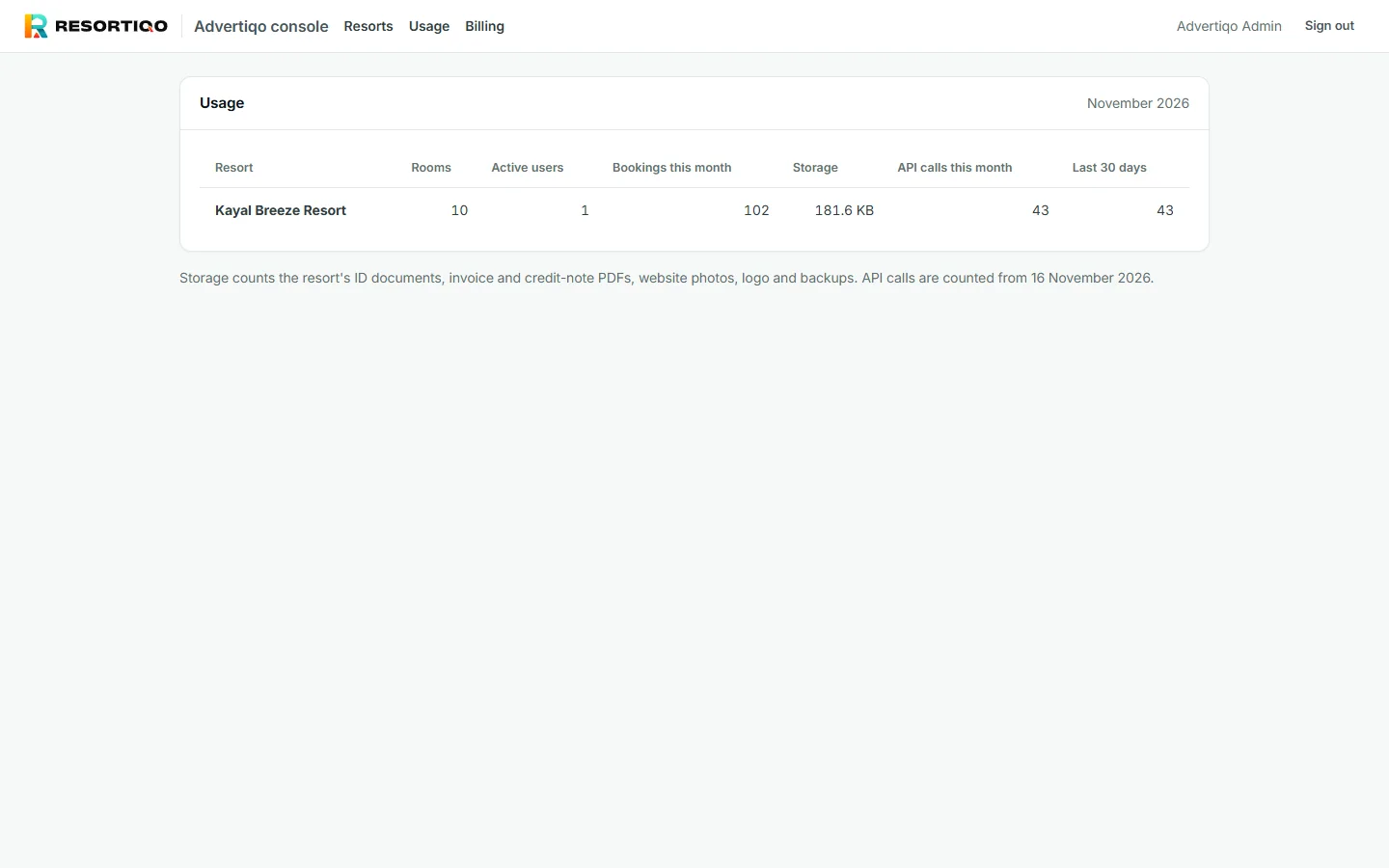
Usage shows how much each resort actually uses. It helps us see who is outgrowing their plan and who has stopped using the system and may be about to leave.
Everything is logged
Every console action is recorded with who did it and from where. Actions on a resort also appear in that resort's own audit log. We can see what we did, and so can they. Billing is the exception: it is our own business record and does not appear in the resort's log.