
Training / Resort plan / Lesson 9 of 17
Restaurant
Take an order at the table, send it to the kitchen, and either charge it to the guest's room or take payment on the spot. The restaurant is the busiest outlet in most resorts, and the one where money leaks.
- Modules
- M14 Restaurant and POS
- Who uses it
- Waiters, restaurant manager, cashier
- Plan
- Resort plan
- Where
- Outlets › Restaurant
What it is for
In many resorts a waiter writes the order on paper, the kitchen cooks from a second slip, and a third slip is meant to reach the front desk before the guest checks out. Any slip that goes missing is a free meal. Here the order is entered once and follows the guest to their bill.
POS means point of sale: the screen where a sale is rung up. KOT means kitchen order ticket: the slip that tells the kitchen what to cook.
The table board

Tables are grouped by area, here Lakeside Deck and Dining Hall. An occupied table shows the number of covers, which is the trade's word for people eating.
Task 1: take an order
- Tap a free table or press New walk-in order for someone not staying at the resort.
- Link it to a room if the guest is staying, by choosing their booking. A staying guest's order can also be started from their booking page with Start Restaurant Order.
- Add items from the menu, with quantities and any kitchen note such as "less spicy". Items can have priced extras, called modifiers, such as "extra egg".
- Send to the kitchen This prints a KOT. Each time more items are sent, a new numbered KOT round is made.
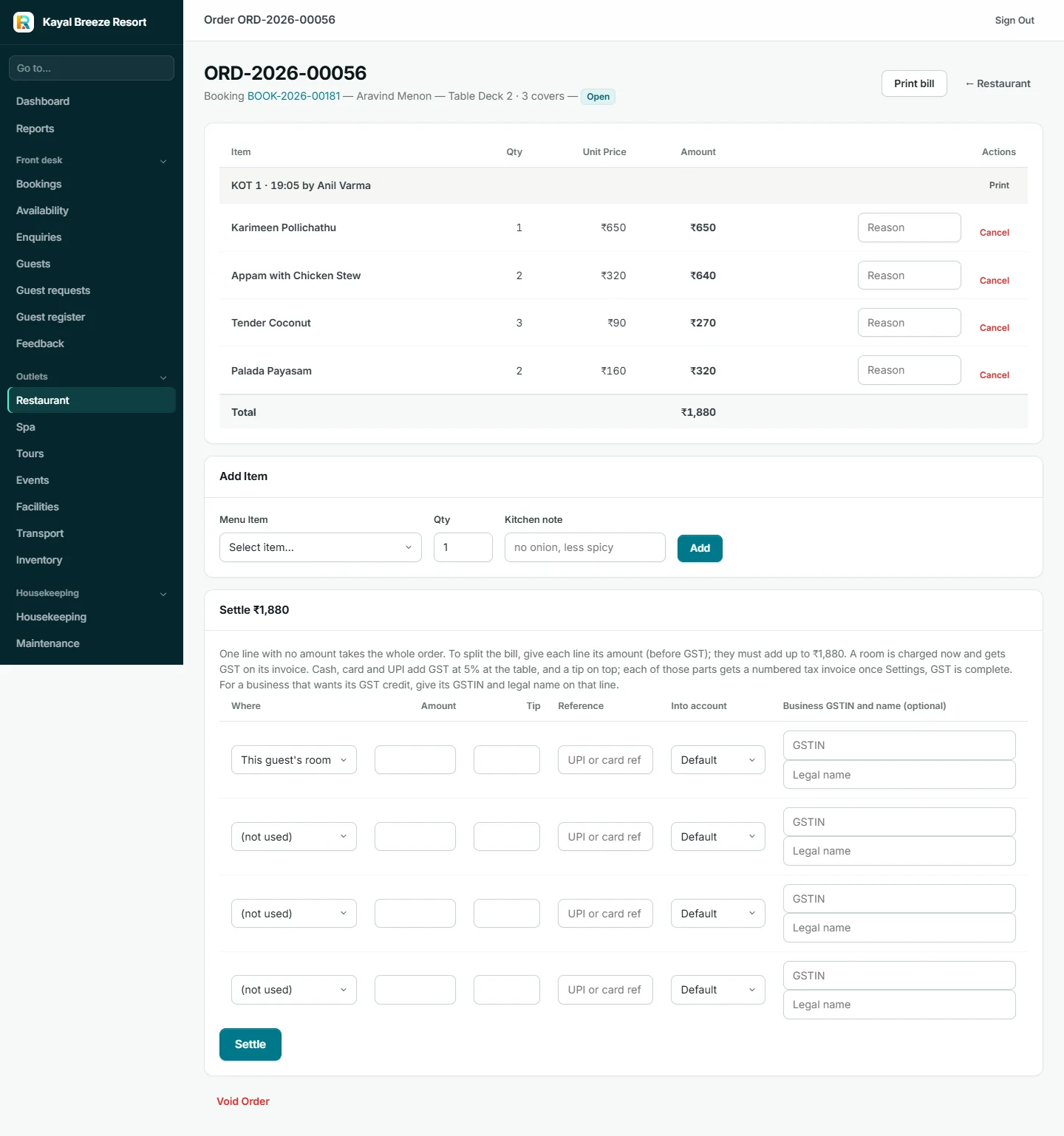
An item that has already gone to the kitchen can only be cancelled with a reason, and the cancellation is counted in the day's close. This is deliberate: it is the commonest way food goes unpaid for.
Task 2: settle the bill
| Way to settle | What happens |
|---|---|
| Charge to room | The amount goes on the guest's bill. GST is shown on the guest's invoice at check-out |
| Pay at the table | Cash, card or UPI. Resortiqo issues a numbered restaurant tax invoice with GST on the spot. A tip can be recorded |
| Split | Part to one room, part to another, or part paid now |
Print bill gives the guest their bill at any time.
Task 3: close the restaurant's day

At closing time the cashier opens Day close. It shows orders settled, covers served, sales by payment method, tips owed to staff, and the exact cash to count in the drawer. All open orders must be settled or voided first.
Setting up
- Menu Items: each dish with its category, price and tax rate.
- Tables: name, area and seats.
- Outlets: only if the resort has more than one place selling food or drink, such as a restaurant and a pool bar. Each outlet then has its own menu, tables and day close.

What it connects to
- Room charges go on the guest's bill
- GST on the invoice
- Recipes take ingredients out of stock
- Night audit flags open orders
- Waiters can use the staff app's Orders tab
No kitchen display screen and no direct link to a kitchen printer. KOTs print through the browser on whatever printer the computer has. A resort that wants tickets to appear in the kitchen automatically needs a tablet or a second computer there, opened on the order.
No bar-specific features such as measures or happy hours.
"Your waiter enters the order once. It prints for the kitchen and it lands on the guest's room bill by itself. At night the screen tells your cashier exactly how much cash should be in the drawer."