
Training / Resort plan / Lesson 11 of 17
Events and banquets
Weddings, receptions, conferences, birthday parties. An event starts as an enquiry for a venue and a date, and ends as a paid bill, with a printed order sheet for the kitchen and set-up team in between.
- Modules
- M17 Events and venues
- Who uses it
- Events or sales manager, owner
- Plan
- Resort plan
- Where
- Outlets › Events
What it is for
An event has more moving parts than a stay: a venue that must not be double-booked, a headcount that changes, a menu, a decorator, deposits in stages. This screen keeps one record per event so the kitchen, the set-up team and accounts all work from the same facts.
Task 1: take an event enquiry

- Press + New Enquiry Choose the venue, the date and the time slot: Morning, Afternoon, Evening or Full Day.
- Enter the organiser their phone, the expected number of guests (pax) and the quoted amount.
- Link it to a stay, if there is one For example, a wedding party that is also staying. Then event charges can go onto that booking's bill.
- Move it on Confirm when the organiser commits, Mark Completed afterwards, or Cancel Event.
Venues, each with a capacity, are set up once under Venues.
Task 2: write the banquet event order
A banquet event order, or BEO, is the one-page sheet every department works from on the day. It is the standard document in the banquet trade.
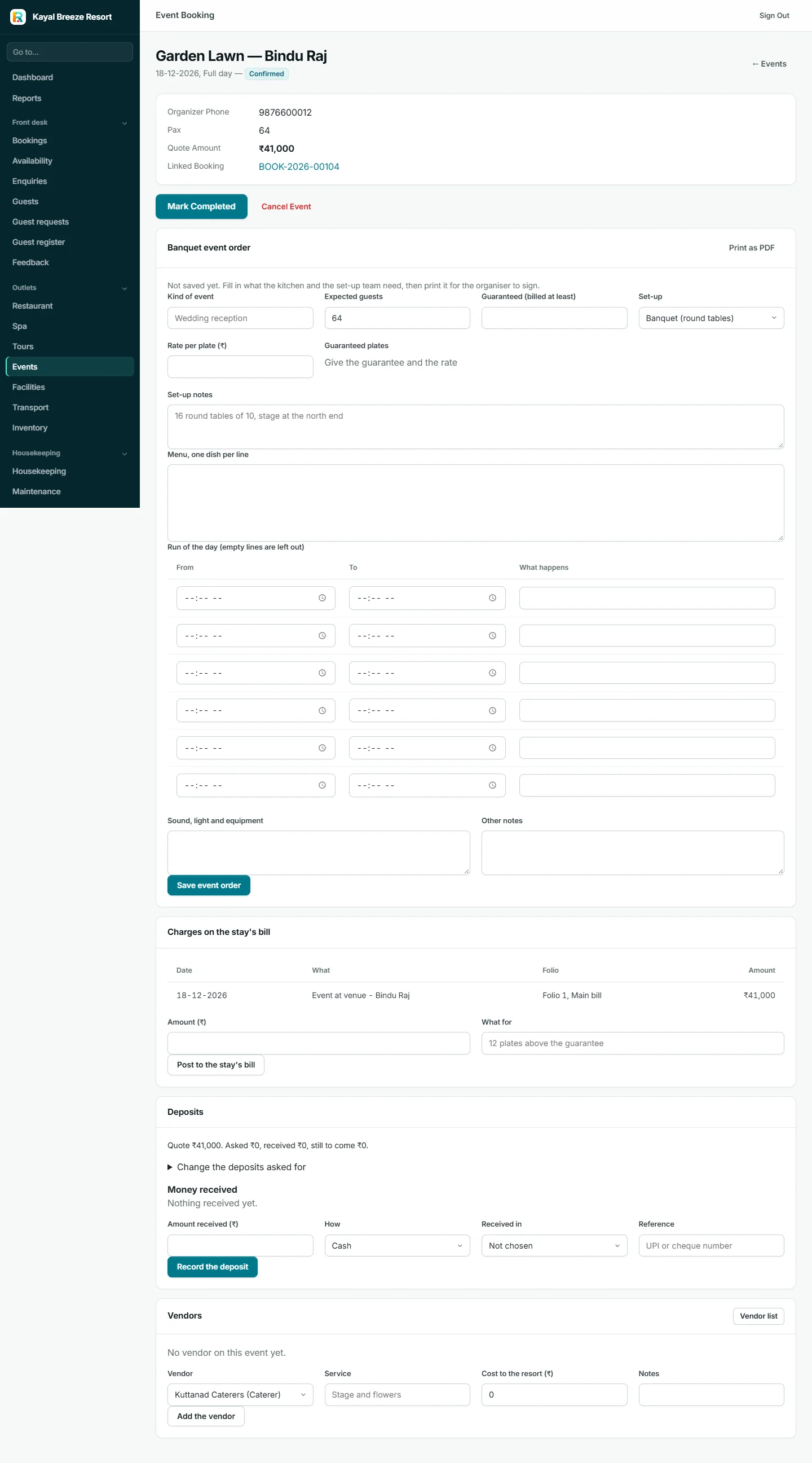
It records:
- Expected guests and guaranteed guests. The guaranteed number is the minimum the organiser agrees to pay for, even if fewer come.
- Rate per plate and guaranteed plates.
- Set-up: round tables, rows of chairs, classroom, U-shape, standing cocktail.
- Menu, one dish per line.
- Run of the day: what happens from when to when.
- Sound, light and equipment.
Print as PDF produces a sheet for the organiser to sign. A signed BEO settles most arguments about what was promised.
Task 3: handle the money
- Charges on the stay's bill. The event's amount, and anything added on the day, is posted to a folio of the linked booking.
- Deposits. A schedule of amounts and due dates. Money received is held as an advance and applied to the bill. Reminders can go to the organiser before each due date.
- Vendors. Decorators, caterers, sound and light, photographers and florists are kept in a vendor list and added to an event with their cost. That cost is posted to Expenses, or as a supplier bill, so the owner sees the event's real profit.

What it connects to
- Group bookings and deposits
- Charges go to a folio
- Vendors can be suppliers
- Deposit reminders use scheduled messages
A venue cannot be booked twice for the same date and time slot; Resortiqo refuses the second one. What is missing is a function sheet: one page showing every event in every venue for a day.